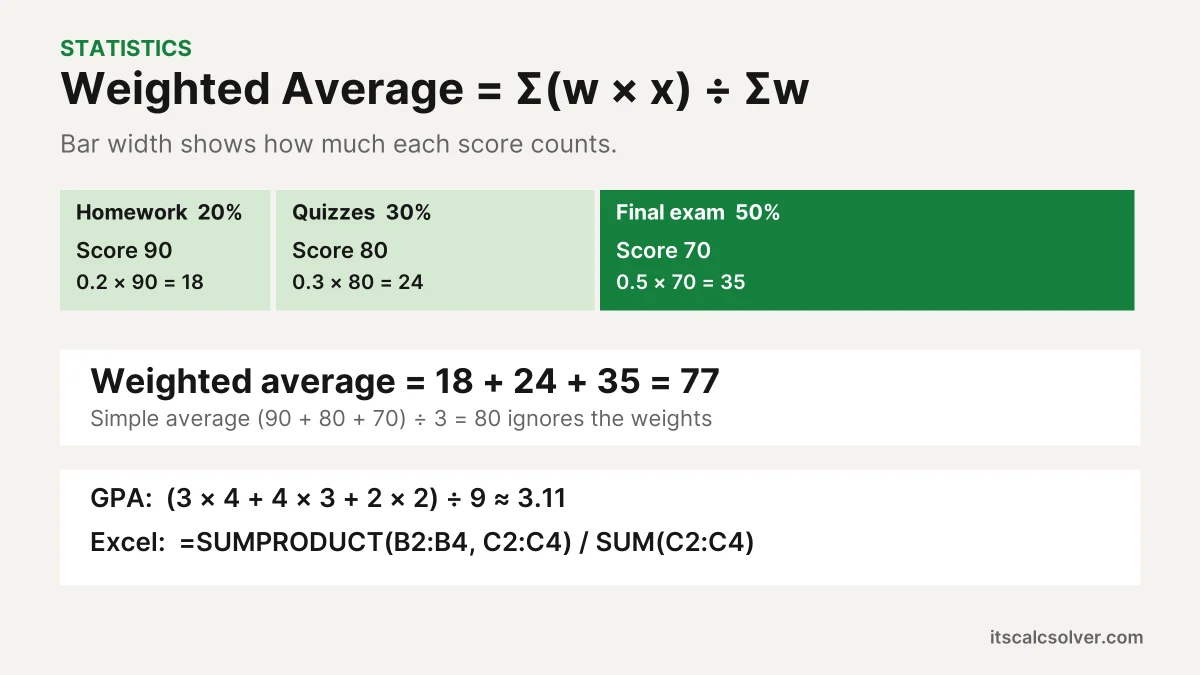
A weighted average multiplies each value by its weight, adds the results, and divides by the total of the weights: weighted average = Σ(w × x) ÷ Σw. If homework (90) counts 20%, quizzes (80) count 30% and the final exam (70) counts 50%, the grade is 0.2 × 90 + 0.3 × 80 + 0.5 × 70 = 18 + 24 + 35 = 77, not the simple average of 80.
In short: Use a weighted average when some values matter more than others: course grades, GPA, prices bought in different amounts, or average speed over different times. If every weight is equal, it is the same as the normal mean.
In this guide
- The weighted average formula
- How to calculate it in 4 steps
- Example: course grade with percentages
- Example: GPA with credit hours
- Example: average price
- Example: average speed
- What score do I need?
- Weighted vs simple average
- Weighted average in Excel and Google Sheets
- Common mistakes
- Practice problems
- FAQ
The Weighted Average Formula
Weighted average = (w₁x₁ + w₂x₂ + … + wₙxₙ) ÷ (w₁ + w₂ + … + wₙ)
Here x is each value and w is how much it counts (its weight). Weights can be percentages, credit hours, quantities or times. When the weights are percentages that add up to 100%, write them as decimals that add up to 1, and you can skip the division.
How to Calculate a Weighted Average in 4 Steps
- List each value and its weight. Convert percentages to decimals (20% = 0.2).
- Multiply each value by its weight.
- Add the products.
- Divide by the sum of the weights. If the weights already add up to 1 (or 100%), this step changes nothing.
Example: Course Grade With Percentage Weights
| Category | Score | Weight | Score × weight |
|---|---|---|---|
| Homework | 90 | 20% = 0.2 | 18 |
| Quizzes | 80 | 30% = 0.3 | 24 |
| Final exam | 70 | 50% = 0.5 | 35 |
| Total | 1.0 | 77 |
The weighted grade is 77. The simple average of 90, 80 and 70 is 80, but that would treat the final exam as if it counted the same as homework. To turn the result into a letter or a percentage, see how to calculate a percentage.
Example: GPA With Credit Hours
Each course counts by its credit hours. Grade points here use the common 4-point scale (A = 4, B = 3, C = 2).
| Course | Grade | Points | Credits | Points × credits |
|---|---|---|---|---|
| Physics | A | 4 | 3 | 12 |
| Calculus | B | 3 | 4 | 12 |
| History | C | 2 | 2 | 4 |
| Total | 9 | 28 |
GPA = 28 ÷ 9 ≈ 3.11. Your school may use a different scale (with plus and minus grades), so check its table of grade points.
Example: Average Price Paid
Example: A shop buys 10 kg of rice at Rs 200 per kg and 30 kg at Rs 260 per kg. Average price = (10 × 200 + 30 × 260) ÷ (10 + 30) = 9,800 ÷ 40 = Rs 245 per kg. The simple average of 200 and 260 is 230, which is wrong because more rice was bought at the higher price.
Example: Average Speed
Example: A car drives 2 hours at 60 km/h and 1 hour at 90 km/h. Weight each speed by its time: (2 × 60 + 1 × 90) ÷ (2 + 1) = 210 ÷ 3 = 70 km/h, which is also total distance ÷ total time. The simple average, 75 km/h, would be wrong.
What Score Do I Need on the Final?
Rearrange the formula to find a missing score, the same way you would solve for x.
Example: Homework (20%) is 90 and quizzes (30%) are 80, and the final is worth 50%. To finish with 80: 0.2 × 90 + 0.3 × 80 + 0.5x = 80, so 42 + 0.5x = 80, 0.5x = 38 and x = 76 on the final.
Weighted Average vs Simple Average
| Simple average (mean) | Weighted average | |
|---|---|---|
| Formula | Sum of values ÷ number of values | Σ(w × x) ÷ Σw |
| Each value counts | Equally | By its weight |
| Example: 4 and 10 | (4 + 10) ÷ 2 = 7 | Weights 1 and 1 give 7 too |
| Use for | Values of equal importance | Grades, GPA, prices, speeds, portfolios |
A frequency table is a weighted average where the weights are the counts: values 1, 2, 3 seen 2, 5 and 3 times give (1·2 + 2·5 + 3·3) ÷ 10 = 2.1. You can find simple means quickly with our mean, median and mode calculator, and see how spread out values are in how to calculate standard deviation.
Weighted Average in Excel and Google Sheets
Put the values in B2:B4 and the weights in C2:C4, then use:
=SUMPRODUCT(B2:B4, C2:C4) / SUM(C2:C4)
SUMPRODUCT multiplies each pair and adds the results; dividing by SUM of the weights makes it work even when the weights do not add up to 1. The same formula works in Google Sheets. For the grade example it returns 77.
Common Mistakes
- Taking the simple average when the items have different weights.
- Dividing by the number of items instead of the sum of the weights.
- Using 20 instead of 0.2 for a 20% weight without dividing by 100 at the end.
- Averaging speeds or prices directly instead of weighting them by time or quantity.
- Weights that do not add up to 100% because a category was left out.
Practice Problems
1. A test counts 40% and a project 60%. You scored 85 on the test and 75 on the project. What is your grade?
0.4 × 85 + 0.6 × 75 = 34 + 45 = 79.
2. You got an A (4.0) in a 3-credit class and a B (3.0) in a 1-credit class. What is your GPA?
(3 × 4.0 + 1 × 3.0) ÷ 4 = 15 ÷ 4 = 3.75.
3. You buy 5 notebooks at Rs 120 and 15 at Rs 150. What is the average price?
(5 × 120 + 15 × 150) ÷ 20 = 2,850 ÷ 20 = Rs 142.50.
4. Coursework counts 60% and the exam 40%. You have 70 in coursework. What exam score gives an overall 75?
0.6 × 70 + 0.4x = 75, so 42 + 0.4x = 75 and x = 82.5.
5. You cycle 3 hours at 40 km/h and 1 hour at 60 km/h. What is your average speed?
(3 × 40 + 1 × 60) ÷ 4 = 180 ÷ 4 = 45 km/h.
FAQ
What is a weighted average in simple words?
It is an average where some numbers count more than others. You multiply each number by how much it counts, add them up, and divide by the total of the weights.
How do you calculate a weighted average?
Multiply each value by its weight, add the products, and divide by the sum of the weights: Σ(w × x) ÷ Σw.
Do the weights have to add up to 100%?
No. Any weights work as long as you divide by their total. When they are percentages adding to 100%, dividing by 1 changes nothing, so you can skip that step.
What is the difference between a weighted average and a mean?
A mean gives every value the same importance. A weighted average lets some values count more. With equal weights the two answers are the same.
How do I calculate a weighted average in Excel?
Use =SUMPRODUCT(values, weights) / SUM(weights), for example =SUMPRODUCT(B2:B4, C2:C4)/SUM(C2:C4).
Sources and Further Reading
- OpenStax Contemporary Mathematics, Section 8.3: Mean, Median and Mode.
- OpenStax Principles of Finance 2e, Section 13.1: Measures of Center (weighted mean).
- Microsoft Support: SUMPRODUCT function.
Related: mean, median and mode calculator, mean, median, mode and range, standard deviation, how to calculate a percentage, percentage calculator and all free math calculators.
Check your working in seconds
Type any problem from this guide into the free CalcSolver calculator and see the answer, with fractions, instantly.