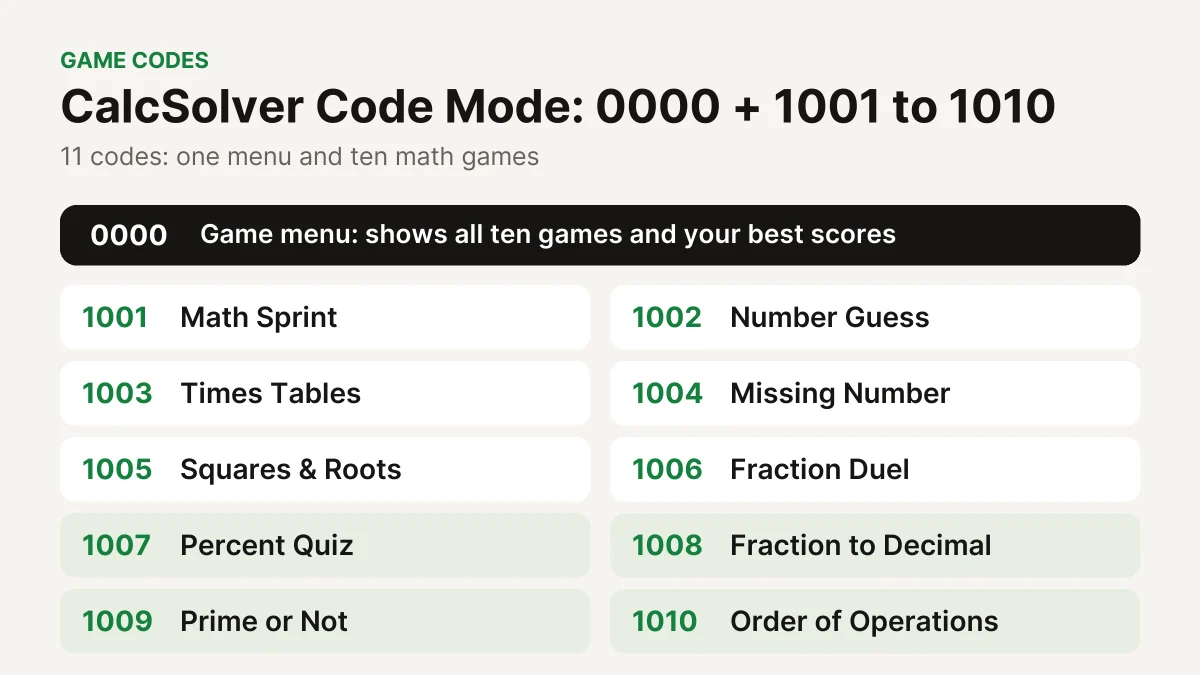
CalcSolver has eleven Code Mode game codes. Turn on Code Mode, type 0000 and press = to see all ten math games, or type a game’s own code to open it directly: 1001 Math Sprint, 1002 Number Guess, 1003 Times Tables, 1004 Missing Number, 1005 Squares & Roots, 1006 Fraction Duel, 1007 Percent Quiz, 1008 Fraction to Decimal, 1009 Prime or Not and 1010 Order of Operations. The games are free, need no download or sign-up, and save your best score in your browser. This guide lists every code, explains how each game is scored, and gives a tip to beat your best.
In short: Code 0000 opens the game menu. Codes 1001 to 1010 open one game each. Any other code shows “Code not found”. Turn Code Mode off to use the calculator normally again.
Play now
Skip the codes: open the calculator with all ten math games ready to play. Free, no sign-up.
Jump straight to a game: Math Sprint · Number Guess · Times Tables · Missing Number · Squares & Roots · Fraction Duel · Percent Quiz · Fraction to Decimal · Prime or Not · Order of Operations.
In this guide
All Code Mode Codes (Full List)
There are exactly seven codes. Each one is four digits long.
| Code | Opens | What you do | How it is scored |
|---|---|---|---|
| 0000 | Game menu | Shows all ten games with their codes and your best scores | — |
| 1001 | Math Sprint | Solve as many sums as you can in 60 seconds | Most correct answers |
| 1002 | Number Guess | Find a hidden number from 1 to 100 using higher or lower hints | Fewest tries |
| 1003 | Times Tables | Pick a table from 2 to 12 and answer 10 questions | Out of 10 |
| 1004 | Missing Number | Find the number that makes each equation true | Out of 10 |
| 1005 | Squares & Roots | Square a number or find a square root, from 2 to 15 | Out of 10 |
| 1006 | Fraction Duel | Pick the bigger fraction, or say they are equal | Out of 10 |
| 1007 | Percent Quiz | Work out a percent of a number, such as 20% of 150 | Out of 10 |
| 1008 | Fraction to Decimal | Match a fraction to its decimal, such as 3/8 = 0.375 | Out of 10 |
| 1009 | Prime or Not | Decide if a number from 2 to 99 is prime | Out of 10 |
| 1010 | Order of Operations | Solve sums such as 2 + 3 × 4 in the right order | Out of 10 |
How to Enter a Code in Code Mode
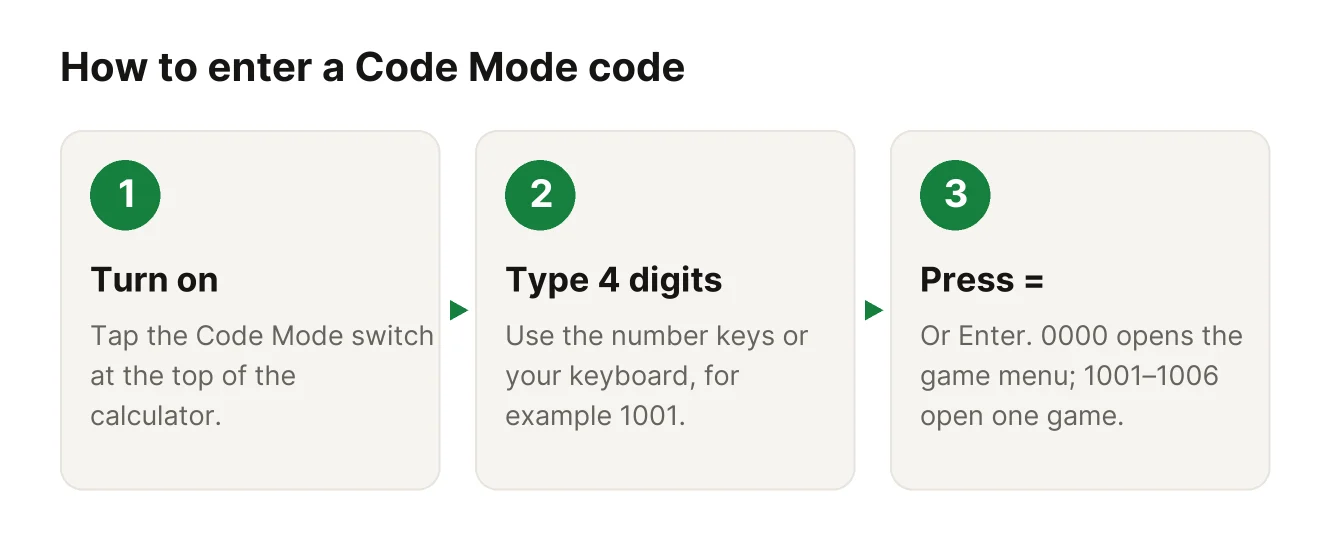
Code Mode is a switch on the CalcSolver scientific calculator. While it is on, the number keys type a code instead of a sum.
- Turn on Code Mode. Tap the Code Mode switch at the top of the calculator.
- Type the four digits. Use the on-screen keys or your keyboard. AC clears the code and DEL removes the last digit.
- Press = or Enter. 0000 opens the game menu. A game code such as 1003 opens that game straight away.
Shortcut: the Games link in the site menu, and the game links in the footer, enter the code for you. You can also add #games- and a code to the home page address, for example itscalcsolver.com/#games-1001, to open Math Sprint directly.
Each Game Explained, With a Tip to Win
1001: Math Sprint
You get 60 seconds to answer as many sums as you can. The game starts with addition and subtraction of numbers up to 15. After 3 correct answers it adds multiplication, and after 8 it adds division. Every 5 correct answers, the numbers get bigger. A wrong answer shows the right one and moves on, so it costs time but no points.
Example: Your best Sprint score is the most sums you solved in one round. To raise it, practise the mental math tricks for adding near tens, such as 38 + 27 = 40 + 27 − 2 = 65.
1002: Number Guess
The game hides a whole number from 1 to 100. After each guess it says “Higher than” or “Lower than”, and your score is the number of tries. Fewer tries is better.
The best strategy is to guess the middle of the numbers that are still possible. Each guess cuts the range in half, so you never need more than 7 tries, because 27 = 128 is more than 100.
Example: Say the hidden number is 73. Guess 50 (higher), then 75 (lower), 62 (higher), 68 (higher), 71 (higher), and 73. Found in 6 tries.
1003: Times Tables
Pick any table from 2 to 12. You then get 10 questions from that table, with the multipliers 1 to 12 in a random order and no repeats. Your score is out of 10, and each table keeps one shared best score.
Example: For the 9 times table, multiply by 10 and subtract the number once: 9 × 7 = 70 − 7 = 63.
1004: Missing Number
Each question is a short equation with one number replaced by “?”. There are three kinds: a + ? = b, ? − a = b and a × ? = b. This is the same idea as solving for x, without the letter.
Example: Undo the operation with its opposite. 7 + ? = 19, so ? = 19 − 7 = 12. ? − 8 = 23, so ? = 23 + 8 = 31. 6 × ? = 54, so ? = 54 ÷ 6 = 9.
1005: Squares & Roots
Each question asks for a square, such as 12², or a square root, such as √144. Every number is from 2 to 15, so learning the 14 squares below covers the whole game. For the method behind them, see our guide to square roots and cube roots.
| n | 2 | 3 | 4 | 5 | 6 | 7 | 8 | 9 | 10 | 11 | 12 | 13 | 14 | 15 |
|---|---|---|---|---|---|---|---|---|---|---|---|---|---|---|
| n² | 4 | 9 | 16 | 25 | 36 | 49 | 64 | 81 | 100 | 121 | 144 | 169 | 196 | 225 |
1006: Fraction Duel
Two fractions appear, and you pick the bigger one or choose “Equal”. The bottom numbers go up to 12, and some rounds are true ties, such as 2/3 and 8/12. The game has 10 rounds.
Example: Cross-multiply to compare without decimals. For 5/8 or 3/5: 5 × 5 = 25 and 3 × 8 = 24. Since 25 is bigger, 5/8 is bigger (0.625 vs 0.6). For 2/3 or 8/12: 2 × 12 = 24 and 8 × 3 = 24, so they are equal. Our equivalent fractions guide explains why.
1007: Percent Quiz
You get 10 questions such as “20% of 150” and type the answer. The percents are friendly ones (5%, 10%, 20%, 25%, 30%, 40%, 50% and 75%), and every answer is a whole number.
Tip: Start from 10%. 10% of 150 is 15, so 20% is 30. See how to calculate a percentage for more shortcuts.
1008: Fraction to Decimal
A fraction appears and you pick its decimal from three choices. Every fraction in the game gives a decimal that ends, such as 3/8 = 0.375. The game has 10 rounds.
Tip: Learn the eighths: 1/8 = 0.125, so 3/8 = 3 × 0.125 = 0.375. Our fraction to decimal guide shows the long division.
1009: Prime or Not
A number from 2 to 99 appears and you choose Prime or Not prime. About half the numbers are prime. The game has 10 rounds.
Tip: Check division by 2, 3, 5 and 7 only. 91 looks prime, but 91 = 7 × 13. The prime factorization chart lists 1 to 100.
1010: Order of Operations
You solve 10 sums that mix +, −, ×, ÷, brackets and squares, and type the answer.
Tip: Brackets first, then powers, then × and ÷, then + and −. So 2 + 3 × 4 = 14, but (2 + 3) × 4 = 20. Read the PEMDAS guide for more.
Where Are Best Scores Saved?
Best scores are saved in your browser’s local storage on your own device. Nothing is sent to a server and there is no account. Because of this, your scores will not appear on another device or browser, and they are lost if you clear site data or use a private window.
Code Not Working? Quick Fixes
| What you see | Why | Fix |
|---|---|---|
| “Enter all 4 digits” | You pressed = with fewer than 4 digits | Type all four digits, for example 0000 |
| “Code not found. Try 0000.” | The code is not one of the seven codes | Use 0000 or a code from 1001 to 1006 |
| The calculator will not do sums | Code Mode is still on | Tap the Code Mode switch to turn it off |
| Your best scores are gone | A different browser, or site data was cleared | Scores are stored per browser, so play on the same one |
Código 0000 de la calculadora (en español)
El código 0000 abre el menú de juegos de CalcSolver. Activa Code Mode con el interruptor de la parte superior de la calculadora, escribe 0000 y pulsa = o Enter para ver los diez juegos de matemáticas. Los códigos 1001 a 1010 abren cada juego directamente: 1001 Math Sprint, 1002 Number Guess, 1003 Times Tables, 1004 Missing Number, 1005 Squares & Roots, 1006 Fraction Duel, 1007 Percent Quiz, 1008 Fraction to Decimal, 1009 Prime or Not y 1010 Order of Operations.
Los juegos son gratis, no necesitan descarga ni registro y guardan tu mejor puntuación en el navegador. Para volver a la calculadora normal, desactiva Code Mode.
FAQ
What is the 0000 code on CalcSolver?
Code 0000 opens the Code Mode game menu, which lists all ten math games with their codes and your best scores.
What are all the CalcSolver game codes?
There are seven: 0000 for the game menu, 1001 Math Sprint, 1002 Number Guess, 1003 Times Tables, 1004 Missing Number, 1005 Squares and Roots, 1006 Fraction Duel, 1007 Percent Quiz, 1008 Fraction to Decimal, 1009 Prime or Not, and 1010 Order of Operations.
Are there any secret or hidden codes?
No. These seven codes are the full list. Any other four-digit code shows “Code not found. Try 0000.”
Are the games free, and do I need to sign up?
Yes, they are free, and there is no download, account or sign-up. They run in your browser.
How do I go back to the normal calculator?
Tap the Code Mode switch again to turn it off. The keys then work as a normal scientific calculator.
What is the fewest tries possible in Number Guess?
One, if you guess right first time. With the halve-the-range strategy you will always find the number in 7 tries or fewer.
What is the 4-digit code in CalcSolver Code Mode?
Code Mode uses four-digit codes. 0000 opens the menu of all ten math games, and 1001 to 1010 open one game each. Any other code shows “Code not found”.
How do I open Code Mode on the calculator?
Tap the Code Mode switch at the top of the CalcSolver calculator, type the four digits, then press = or Enter. You can also open itscalcsolver.com/#games-1001 to start Math Sprint directly.
What does calculator code 0000 do?
On CalcSolver, code 0000 opens the game menu. It lists all ten free math games with their codes and your best scores.
Ready to play? Start with Math Sprint, or open the full game menu. For a test coming up, pair the games with our plan for how to study for a math test.
Check your working in seconds
Type any problem from this guide into the free CalcSolver calculator and see the answer, with fractions, instantly.